Sample Certificate & Verifier Guide
A privacy-safe demonstration of a ProofIt certificate, a field-by-field explanation, and steps to verify a real certificate without uploading private files on this page.
Demo only — not a live customer certificate.
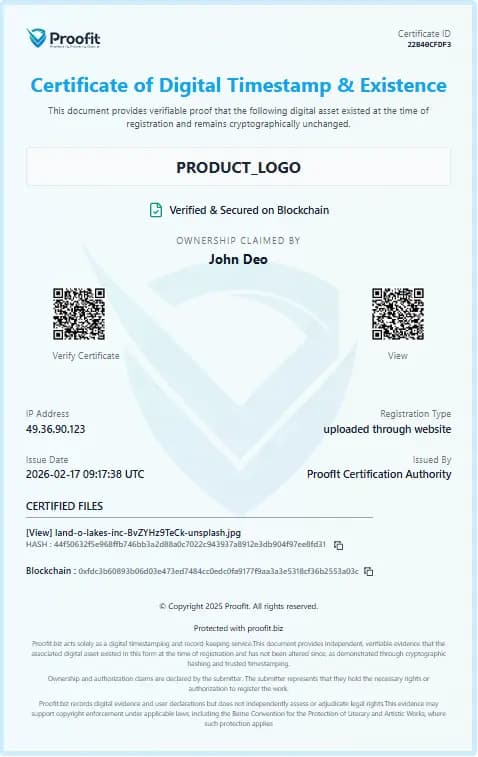
Field-by-field guide
Certificate ID
Unique ProofIt identifier used for public verification and QR links.
Title / project name
Label you assigned to the certified work or package.
Ownership claimed by
Account display name associated with the certificate. This is a claimed attribution on the certificate, not automatic legal ownership.
SHA-256 hash
Cryptographic fingerprint of the file content used for integrity checks.
Blockchain reference
Ethereum transaction / registry reference for the recorded fingerprint. Permanent once written; not reversed on cancel.
RFC 3161 trusted timestamp
Where present, a TSA-signed time (for example Sectigo) proving the hash existed at a specific UTC time. Independently verifiable if you retain the token.
QR verification link
Opens ProofIt’s verify flow with the certificate ID prefilled.
How to verify a certificate
- Open https://proofit.biz/verify (no login required for ID checks).
- Enter the certificate ID from the certificate or scan the QR code.
- Review returned project details, hashes, blockchain status, and TSA details where available.
- Remember: verification supports existence, time, and integrity — not automatic legal ownership or guaranteed court acceptance.